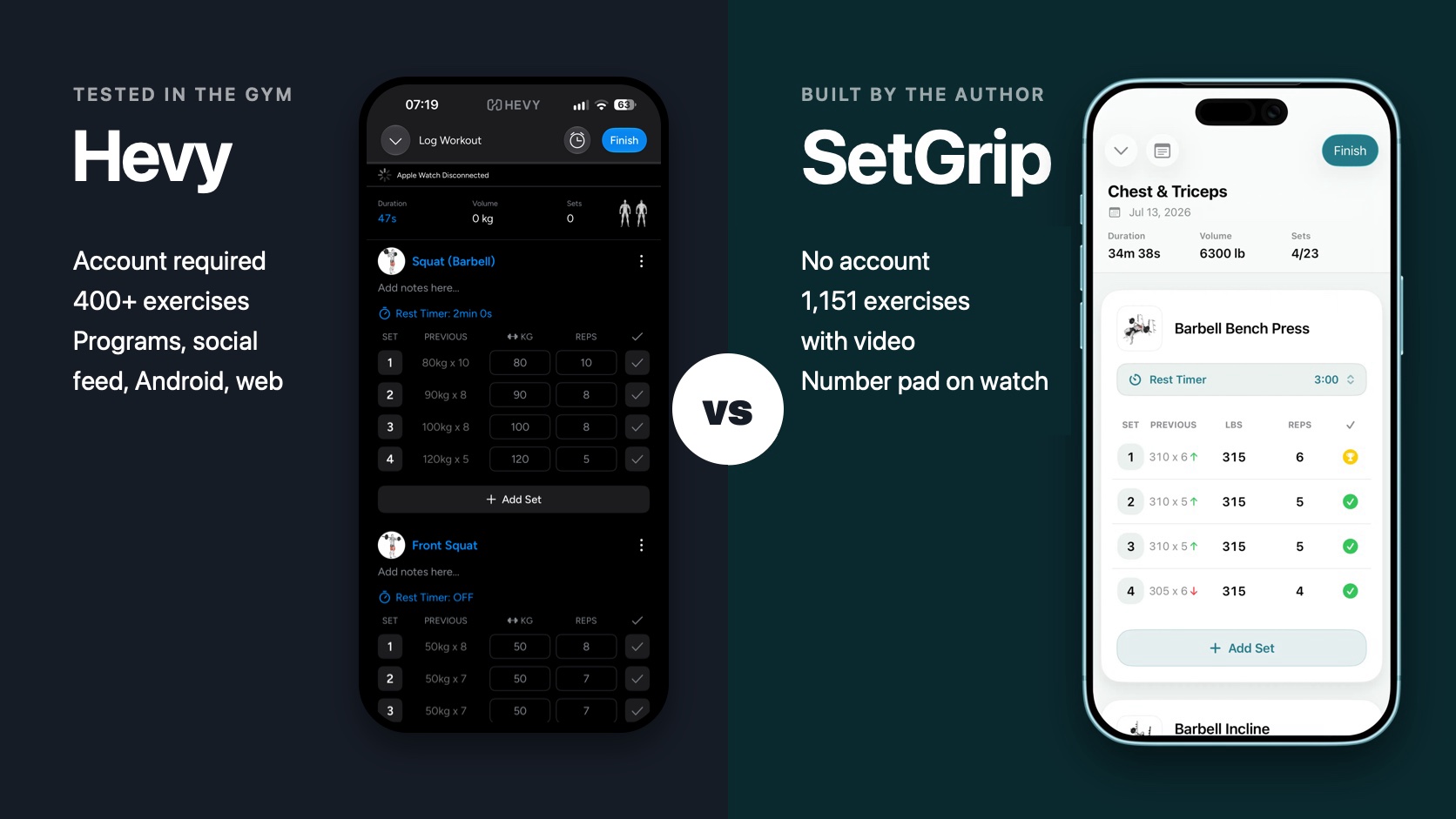
I am the developer of SetGrip, so I am not neutral. To keep this useful anyway, I did the same two things as in my comparison with Strong. I used Hevy in my own gym sessions for a week, from September 27 to October 3, 2026, on the free plan, on an iPhone and an Apple Watch Ultra. And every claim about Hevy below comes from Hevy's own App Store listing or help centre, linked where it is used. Claims about SetGrip were checked against its source code.
Hevy is a good app and I liked using it. Logging a workout on the phone is simple, there are ready-made routines to start from, and there are a lot of statistics. It has a 4.9 rating from about 96,000 ratings in the US App Store. SetGrip launched in July 2026 and has a handful of ratings. That difference in maturity is real, and you will see it in the table below.
SetGrip vs Hevy at a glance
| SetGrip | Hevy | |
|---|---|---|
| Account | None. No sign-up, no login | Email, Google or Apple sign-in |
| Where data lives | Your iPhone and your private iCloud | Hevy's servers, tied to your account |
| Platforms | iPhone (iOS 26) and Apple Watch (watchOS 26) | iPhone (iOS 15.1), Apple Watch (watchOS 8), Android, Wear OS, web |
| Built-in exercises | 1,151, all with video and instructions | 400+, with animation and instructions |
| Custom exercises | No | Yes. 7 free, unlimited in Pro |
| Free routine limit | 3 routines | 4 routines |
| History on the free plan | All of it | 3 months of workout and statistics history |
| Price (US) | $4.99 month, $29.99 year, $99.99 lifetime | $2.99 or $3.99 month, $23.99 year, $74.99 lifetime |
| Weight entry on Apple Watch | Number pad, or Digital Crown | Scrolling picker |
| Ready-made programs | No | 26 programs and 7 routine categories |
| Social feed | No | Yes. Profiles are public by default |
| Export | CSV and JSON, free | CSV |
| Import | No | Strong CSV |
| Plate and warm-up calculators | No | Plate calculator, warm-up calculator in Pro |
| Plateau alerts | Yes, in Premium | Progression suggestions in Hevy Trainer (Pro) |
| Languages | 7 | 16 |
Hevy details come from its US App Store listing and help centre, checked on October 4, 2026. Apps change, so check the linked pages if you read this much later.
What I liked about Hevy
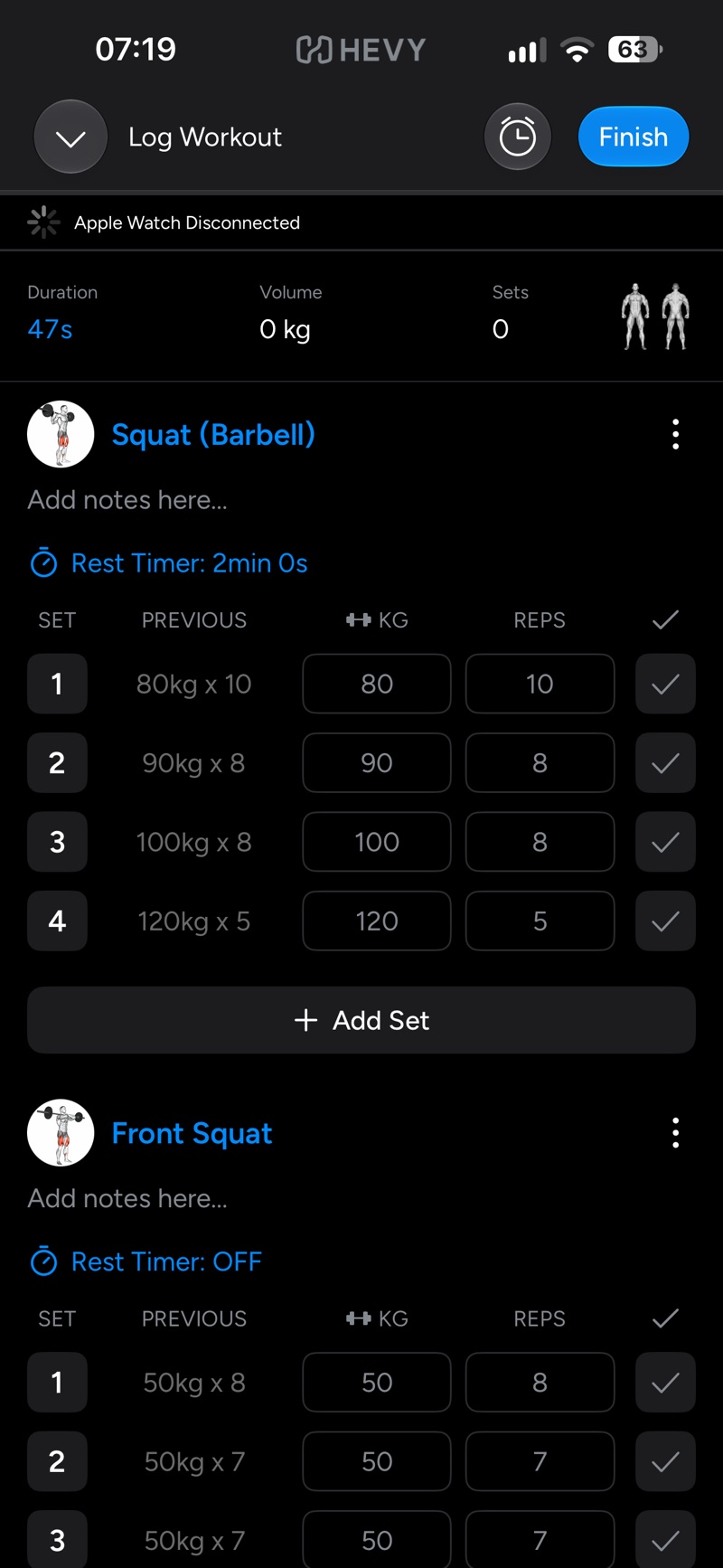
Hevy is easy to pick up. The workout screen on the phone shows the previous weight and reps next to each set, the rest timer is set per exercise, and finishing a set is one tap. I did not need to read anything to log my first session.
It also gives a beginner more to start from than SetGrip does. Hevy has a pre-built library of 26 training programs and seven routine categories, filtered by level, goal and equipment, and you can save any of them to your profile. SetGrip has no ready-made programs. You build your own routines from the exercise library.
The statistics are broad too. Hevy's statistics include a body heat map of the last seven days, muscle distribution charts, your most-logged exercises, a monthly report and leaderboards against people you follow. Set count per muscle group is part of Pro.
Apple Watch: connecting
The first connection between the phone and the watch took a while, but it worked, and most sessions after that started without trouble.
Some did not. A few times I started a workout and the phone showed “Apple Watch Disconnected” even though the watch was on my wrist and connected to the phone. What fixed it each time was closing Hevy completely on the iPhone, opening it again, and then opening the Hevy app on the watch. It is a small extra job, but it comes at the moment you want to start training.
Hevy documents this. Its Apple Watch troubleshooting guide says “Syncing can occasionally be delayed or temporarily interrupted, even when the connection generally works” and lists the same steps I ended up using: open Hevy on both devices, then close and reopen the apps, then restart the devices.
To be fair to Hevy, SetGrip's watch app depends on the same link. The SetGrip watch app is a companion to the iPhone app and needs the phone in Bluetooth or Wi-Fi range. If the connection drops, your sets are queued on the watch and applied when the phone is back. The difference I can state for certain is the one before the connection: SetGrip has no account, so there is nothing to sign into on either device.
Apple Watch: entering the weight
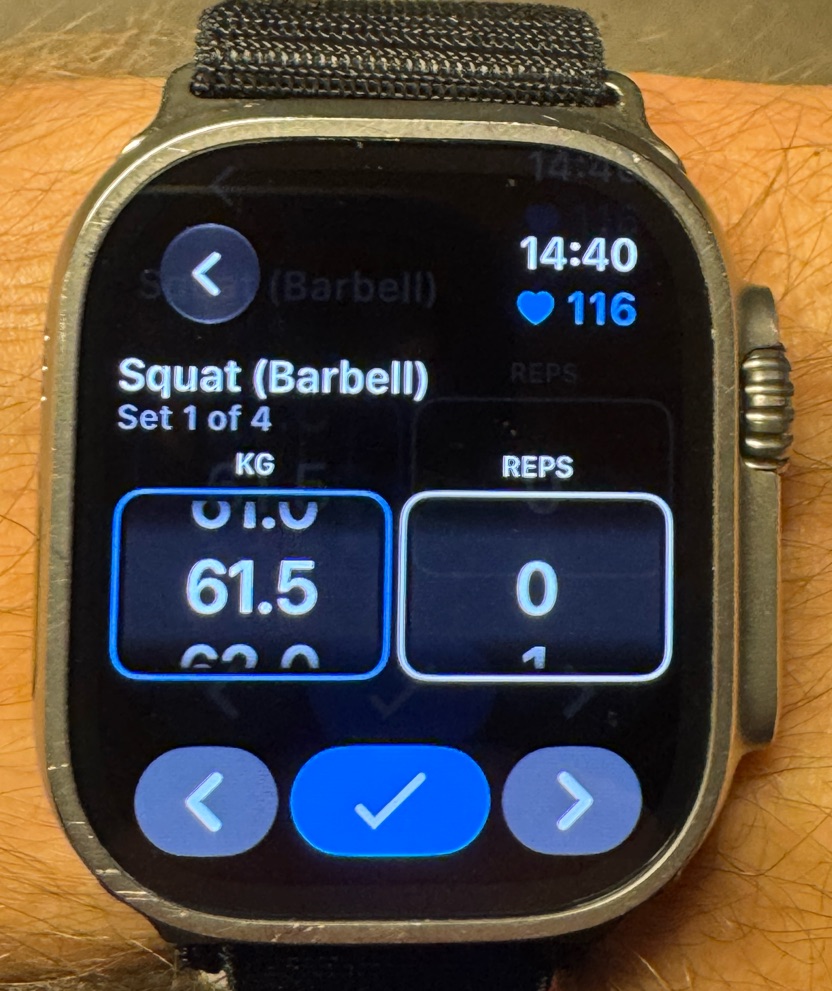
This was my biggest problem with Hevy. On the watch the weight is chosen with a scrolling picker. In my sessions the picker started at 0, so to log a squat at 90 or 100 kg I had to scroll all the way up from zero, between sets, with a pulse of 116. Reps work the same way but the numbers are small, so that part is fine.
SetGrip handles this differently. The weight on the watch starts at the value saved for that set. Tapping it opens a number pad, so 100 kg is three taps and OK. You can also turn the Digital Crown, which moves the weight in 0.25 kg steps.
 Hevy
Hevy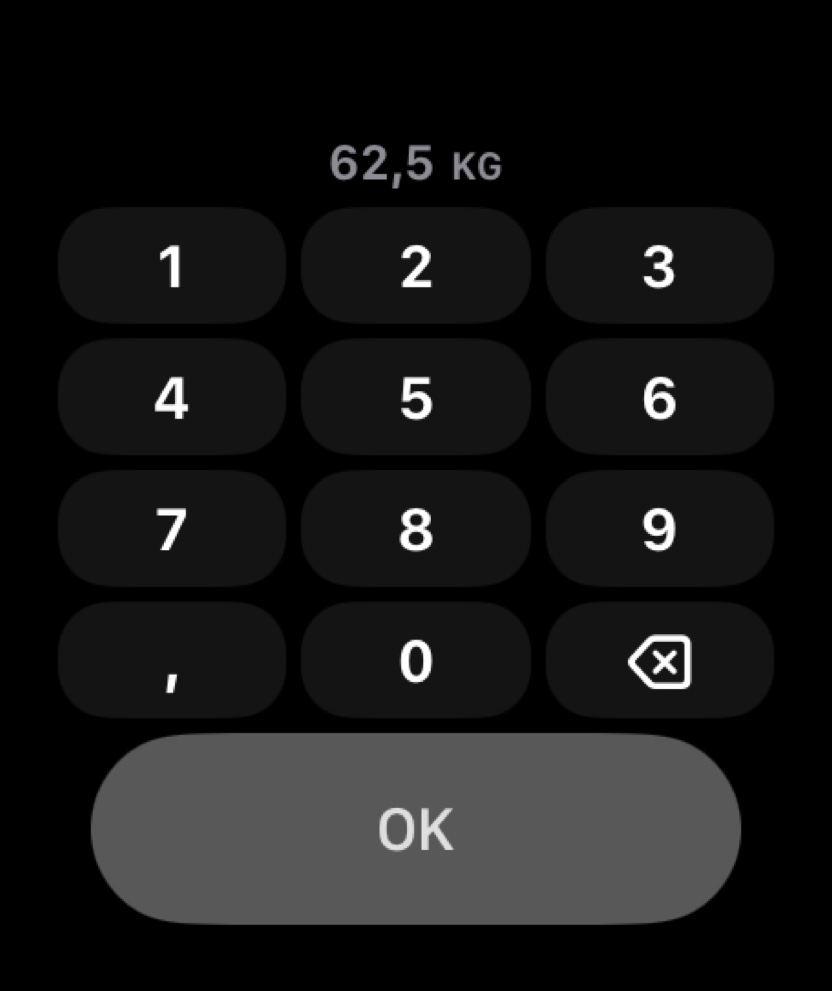 SetGrip
Apple Watch: the rest timer
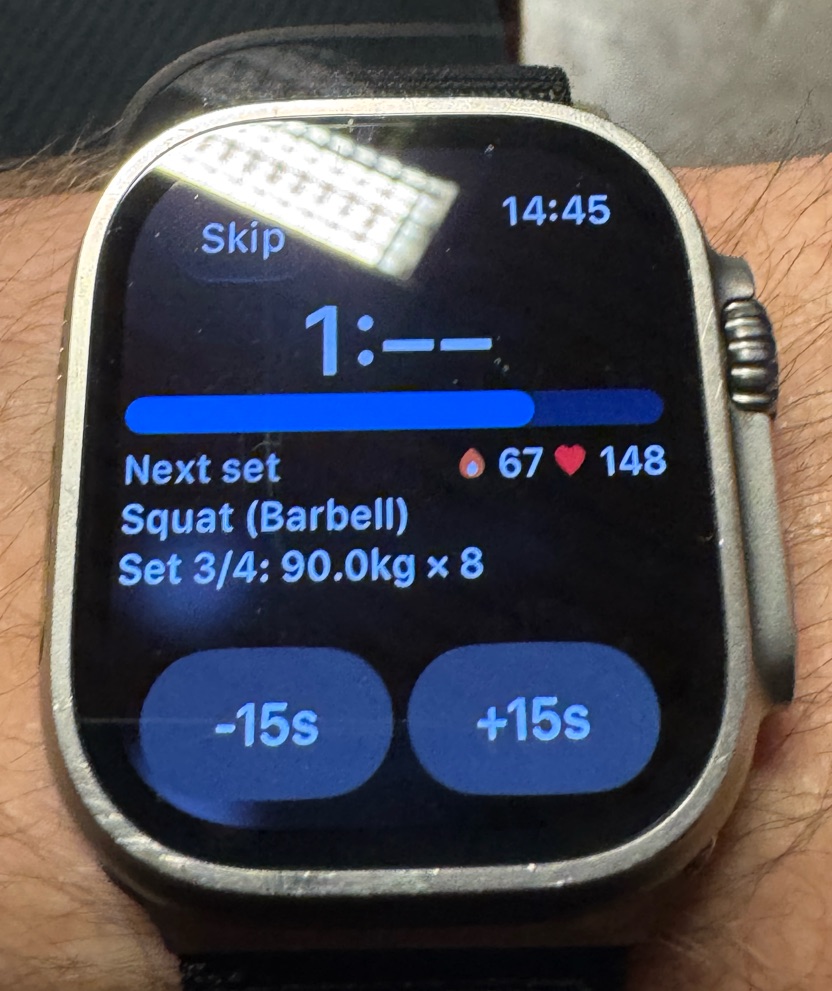
Hevy's rest screen on the watch is good. It shows the countdown, a progress bar, calories and heart rate, the next set with its target weight and reps, and buttons for minus and plus 15 seconds.
When the wrist is down and the watch dims, Hevy hides the seconds and shows something like “1:--”. I like that idea. The downside is what happens when you look at the watch again: sometimes I waited around five seconds before the countdown started moving. My guess is that this saves battery. It is a guess, Hevy does not say.
 Hevy
Hevy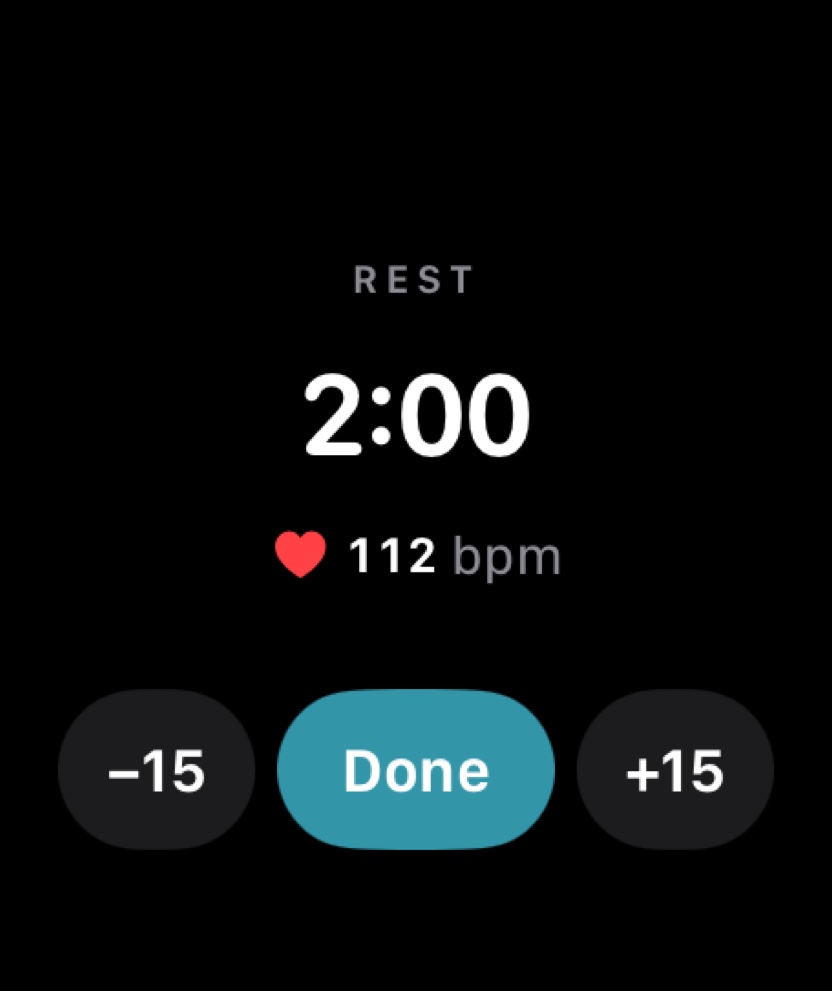 SetGrip
Is it just me? What low-star reviews say
One week on one watch is a small sample, so I checked whether other people describe the same things. On October 4, 2026 I read the 1 to 3 star reviews of Hevy that the App Store shows in the US, UK, Canada, Australia and Germany: 460 of them, 203 written in 2026. Keep the scale in mind. Hevy has a 4.9 average, and in the most recent 1,000 written US reviews only 24 were 3 stars or lower. These are the unhappy few, not the typical user.
Among those 460, the Apple Watch was the most common subject. 95 mention a watch problem, and 75 of those are about the connection or live sync, 39 of them from 2026. The three things I ran into all appear:
- Connection.“the Apple Watch live sync is constantly breaking between updates. When this happens, I basically have to uninstall, restart my iPhone and Apple Watch, then reinstall.” (US, 3 stars, September 24, 2026)
- Weight entry.“you have to start from zero on every single exercise and scroll till you get to your weight and lock it in.” (US, 3 stars, July 15, 2026). Another reviewer asks for exactly what SetGrip does: “I’d like to be able to input the weight amounts without using the Digital Crown. Perhaps a keypad that pops up to input the weights.” (US, 3 stars, September 14, 2026)
- Timer with the wrist down.“When I try to use my watch, it stops the timer every time my watch goes black” (US, 1 star, April 6, 2026)
The other frequent subjects were lost or unsaved workouts (44 reviews), missing exercises (32), the 4-routine limit on the free plan (23) and the social features (17). I could not check any of these reviews myself, and the App Store does not show which app version each one was written for, so read them as what people reported, not as measured facts. The reviews are on Hevy's App Store page.
Exercise library
Hevy's help centre says “Hevy's library has 400+ high-quality exercises” , each with a demonstration animation and step-by-step instructions. That is about twice what Strong ships, and the common lifts are all there. I still ran into the limit, because I train with a lot of variations and several of mine were missing.
Hevy's answer is custom exercises, and it is a better answer than most: a custom exercise can have its own image or video, equipment and muscle targets. On the free plan you can make up to 7, and Pro makes it unlimited.
SetGrip ships 1,151 exercises across 37 muscles and 30 equipment types, and every one has a looping video, numbered steps, difficulty, and primary and secondary muscles. The same library is public on this website, one page per exercise. The honest downside is that SetGrip has no custom exercises yet. If a movement is missing you can request it, and the request board is a Premium feature.
The account and where your data lives
Hevy is built around an account. You sign in with email, Google or Apple, and the help centre is clear about where the data goes: “Your information on Hevy is stored to your profile on our servers, not to your device”. That design is what makes Hevy work across iPhone, Android and the web, and it means a lost phone does not lose your history.
It also comes with a social layer. Hevy's help centre says “By default, Hevy accounts are public”, meaning other users may be able to see your profile and workouts until you turn on Private Profile in the settings. The same page notes that the Discover feed stays on the Home screen and cannot be removed. If you train with friends this is a feature. If you just want a logbook it is something to switch off on day one.
SetGrip has no account, no profile and no feed. Your history is stored on your iPhone and in your own private iCloud, and SetGrip has no server of its own. The cost of that choice is equally clear: no Android app, no web app, and nobody to follow.
Price and what the free version includes
Hevy is cheaper. In the US App Store, Hevy Pro is listed at $2.99 or $3.99 a month, $23.99 a year and $74.99 for lifetime. SetGrip Premium costs $4.99 a month, $29.99 a year with a one-week free trial, and $99.99 once for lifetime. Prices in other countries differ in both apps.
The free plans are limited in different places:
- Hevy free allows 4 routines, 7 custom exercises and 3 months of data history. Workout logging, the Apple Watch app, the social features and most statistics are free.
- SetGrip free allows 3 routines. Workout logging, your full history, the Apple Watch app, rest timers, personal records and export are free. The details are on the free vs Premium help page.
What you pay for is different too:
- Hevy Pro adds unlimited routines and custom exercises, all-time statistics, set count per muscle group, additional body measurements, the warm-up calculator and Hevy Trainer, which builds a program from your goals and suggests when to add weight.
- SetGrip Premium adds unlimited routines, per-exercise statistics and charts, weekly set counts per muscle group, plateau insights with notifications when a lift has stalled, and the feature and exercise request board.
The one free-plan difference I would look at before choosing is history. On Hevy's free plan you can view up to 3 months of workout and statistics history. SetGrip does not limit how far back you can look.
Export and leaving
Hevy exports your workouts and your measurements as CSV files from Settings, and it can import a CSV exported from Strong, which makes moving from Strong to Hevy easy. SetGrip exports finished workouts as CSV, one row per set, or as JSON with heart rate, notes and targets included, for free.
SetGrip has no import. If you switch from Hevy to SetGrip you start with an empty history and keep the Hevy CSV as your archive. That is a real cost of switching, and I say so in the help centre too.
What Hevy has that SetGrip does not
- An Android app, a Wear OS app and a web app. Support for iPhones back to iOS 15.1. SetGrip needs iOS 26.
- A lower price on every plan.
- 4 free routines against SetGrip's 3.
- 26 ready-made programs and a library of ready-made routines.
- Custom exercises with your own image or video.
- Hevy Trainer in Pro, with a generated program and progression suggestions.
- A plate calculator, a warm-up calculator in Pro, and RPE tracking.
- Body weight and waist tracking, with more measurements in Pro.
- A social feed, following, comments, leaderboards and Strava sync.
- Import from Strong.
- 16 languages against SetGrip's 7.
If several of those matter to you, use Hevy. It does more, and it costs less.
What SetGrip offers instead
- No account, no sign-up and no password, on the phone or the watch.
- History stored on your iPhone and in your own private iCloud rather than on the developer's servers.
- No public profile and no feed. There is nothing to make private.
- 1,151 built-in exercises with video against 400+.
- A number pad on the Apple Watch for weight and reps.
- Your full history on the free plan.
- Plateau insights that tell you when a lift's estimated one-rep max has been flat for three weeks or more.
- JSON export next to CSV.
To be exact about privacy: SetGrip is not a zero-network app. It uses anonymous usage analytics (TelemetryDeck), RevenueCat for purchases and WishKit for the request board, and iCloud sync is always on with no switch inside the app. What it does not have is an account, an email address or a workout database on my side. The details are on the privacy page.
Which one should you use?
Use Hevy if you are on Android or an older iPhone, you want to log on the web, you want a ready-made program or a generated one, you train with friends and like a feed, you need custom exercises, or price decides it.
Use SetGrip if you do not want an account or a public profile for your training log, you want a large exercise library where every movement has a video, you log from an Apple Watch and want to type the weight instead of scrolling to it, or you want your history to stay on your own devices.
Both are free to try. SetGrip is free on the App Store and takes no sign-up, so you will know within one workout whether it suits you.
Questions people ask
Is SetGrip better than Hevy?
It depends on what you need. SetGrip is the better fit if you want to train without an account, pick from 1,151 exercises with video, and type weights on the Apple Watch with a number pad. Hevy is the better fit if you need Android or the web, ready-made programs, custom exercises, a social feed, or the lower price.
Does Hevy require an account?
Hevy is built around an account. You sign in with email, Google or Apple, and Hevy's help centre says your information is stored to your profile on Hevy's servers, not on your device. SetGrip has no account and no sign-up. Your history stays on your iPhone and in your own private iCloud.
Is Hevy free? Is SetGrip free?
Both are free to download with unlimited workout logging. Hevy's free plan allows 4 routines, 7 custom exercises and 3 months of workout and statistics history. SetGrip's free plan allows 3 routines and keeps your full history. In the US App Store Hevy Pro is listed at $2.99 or $3.99 a month, $23.99 a year and $74.99 for lifetime. SetGrip Premium is $4.99 a month, $29.99 a year and $99.99 for lifetime, so Hevy is cheaper.
Which app has more exercises, Hevy or SetGrip?
SetGrip ships 1,151 exercises, each with a looping video and step-by-step instructions. Hevy's help centre says its library has 400+ exercises with a demonstration animation and instructions. Hevy lets you create custom exercises, 7 on the free plan and unlimited with Pro. SetGrip does not have custom exercises yet.
Which is better on Apple Watch, Hevy or SetGrip?
Both log sets, run rest timers and show heart rate on the watch, and both need the iPhone nearby. In my week with Hevy the watch sometimes showed as disconnected until I restarted the app, and entering a weight meant scrolling a picker. SetGrip opens a number pad on the watch or lets you turn the Digital Crown, and has no sign-in on either device.
Can I move my workout history from Hevy to SetGrip?
Not directly. Hevy exports your workouts as a CSV file, but SetGrip has no import feature yet, so you start with an empty history and keep the Hevy CSV as your archive. SetGrip exports CSV and JSON for free, so you are not locked in either.